AI Operational Intelligence for Production AI
- Unified operational context from any framework — OTEL-native, no vendor lock-in
- AI-native anomaly detection, AutoJudge, and continuous evals
- Root cause analysis across users, agents, models, tools, infra, cost, and business KPIs
- AI Platform Assistant for cost, quality, safety, release, and incident investigations
AI incidents do not stay inside a model trace. The issue can live in a prompt, model, tool call, API, data pipeline, policy rule, infrastructure dependency, user journey, or business workflow. AnoSys connects those layers so teams can explain the impact and fix the cause.
Agents can return plausible answers while quality, safety, latency, or cost quietly degrades.
AnoSys combines traces, evals, logs, metrics, and business KPIs so teams detect problems before customers, support teams, or executives do.
Runaway token usage, retry loops, model changes, and inefficient workflows can inflate cost without clear ownership.
AnoSys attributes spend to sessions, agents, models, tools, and business processes so teams can optimize with evidence.
AI incidents cross teams: model providers, platform engineering, data, product, support, and business operations.
AnoSys builds causal paths and AI-assisted summaries so teams know what happened, why it happened, and what action resolves it.
AnoSys is organized around the operational path teams follow during real incidents, releases, and cost investigations.
Connect every layer
Bring traces, logs, evals, cost, and workflow events from any framework.
Detect what changed
Surface quality drops, latency drift, retry loops, and cost spikes in context.
Find the root cause
Connect failures to model behavior, tool calls, infra, data, and business KPIs.
Route the fix
Send the right context to the right owner, workflow, dashboard, or report.
The foundation of AnoSys: an OpenTelemetry-native telemetry backbone that ingests traces, metrics, logs, evals, LLM events, business process events, and custom signals into one operational context layer.
 Operational Context
Layer
Operational Context
LayerIngest traces, metrics, logs, evals, LLM calls, and business events via OTLP/HTTP, OpenTelemetry Collector, REST, JavaScript, pixels, or SDKs.
Whether you're running LangChain, CrewAI, OpenAI Agents SDK, Claude Code, Codex, Kubernetes, or custom instrumentation, AnoSys normalizes every signal into one backend. No proprietary agent required, no data silos, and no vendor lock-in.
Schedule Demo Custom Pipelines
Enrich, route, transform, and hydrate signals without brittle glue code. Trigger actions when anomalies, regressions, cost spikes, or policy violations fire.
Build pipelines that filter noise, add business context, attach customer and workflow metadata, and route signals to the right team. Automate remediation through webhooks, Slack, PagerDuty, reports, or internal workflows.
Schedule DemoGo beyond dashboards. AnoSys surfaces failures that matter with anomaly detection, AutoJudge evals, AI-assisted investigation, and causal root cause analysis.
 Anomaly Detection
Spot silent failures, token spikes, latency drift, retry loops, abuse patterns, and business-process bottlenecks in real time—even when dashboards look green.
AnoSys learns normal behavior across every signal you ingest and alerts when things deviate. Detect issues that static thresholds miss: gradual quality regressions, subtle cost creep, and emerging abuse patterns—before they become incidents.
Schedule Demo Continuous Evals
Run evals in CI and production. Catch accuracy drops, safety violations, policy drift, relevance regressions, and business-rule failures before users do.
Define evaluation suites as code, use AutoJudge support, track pass rates and failure modes over time, gate releases on eval results, and alert when production quality or compliance degrades.
Schedule Demo Root Cause Analysis
Go from "something broke" to "here's why" in minutes—with causal paths across agents, models, infrastructure, data pipelines, and business KPIs.
AnoSys builds causal graphs that connect anomalies to their upstream triggers. Correlate a spike in agent errors with a model provider latency increase, a config change, a policy failure, a customer workflow stall, or a data pipeline issue without manual investigation.
Schedule DemoTurn telemetry into operational action with context-aware alerting, cost and quality dashboards, governance views, and an AI Platform Assistant for investigations.
 Alerting & Incidents
Cut alert noise with context-aware routing and auto-escalation. Track ownership from detection to resolution across engineering, product, data, support, and operations teams.
Define alert policies that combine anomaly signals, eval failures, and business KPIs. AnoSys deduplicates, groups, and routes alerts to the right team with full context—so on-call engineers spend time fixing, not triaging.
Schedule Demo Dashboards & KPIs
Pre-built views for model health, agent reliability, token usage, hydrated calls, governance rules, business KPIs, and cost efficiency—with drill-downs for debugging.
Start with out-of-the-box dashboards for common use cases—agent trace explorer, model performance scorecards, cost burn-down charts, SLA views, and workflow health—and customize with drag-and-drop widgets. Drill from a KPI to the exact trace or log line that caused a regression.
Schedule Demo AI Platform Assistant
Ask questions in plain English, auto-generate queries, summarize incidents, compare models, and explain customer-impacting failures without learning another DSL.
Type a question like "Why did agent latency spike yesterday?" and get an answer backed by traces, metrics, and anomaly signals. AnoSys translates natural language into queries, surfaces relevant data, and generates incident summaries you can share with stakeholders.
Schedule DemoGo deeper on the specific workflows teams use AnoSys for in production: tracing, root cause analysis, evals, cost, dashboards, pipelines, governance, and business process intelligence.
A walk through the AnoSys console — from connecting your first signal to tracing an agent run, comparing models, automating detection, and investigating in plain English.
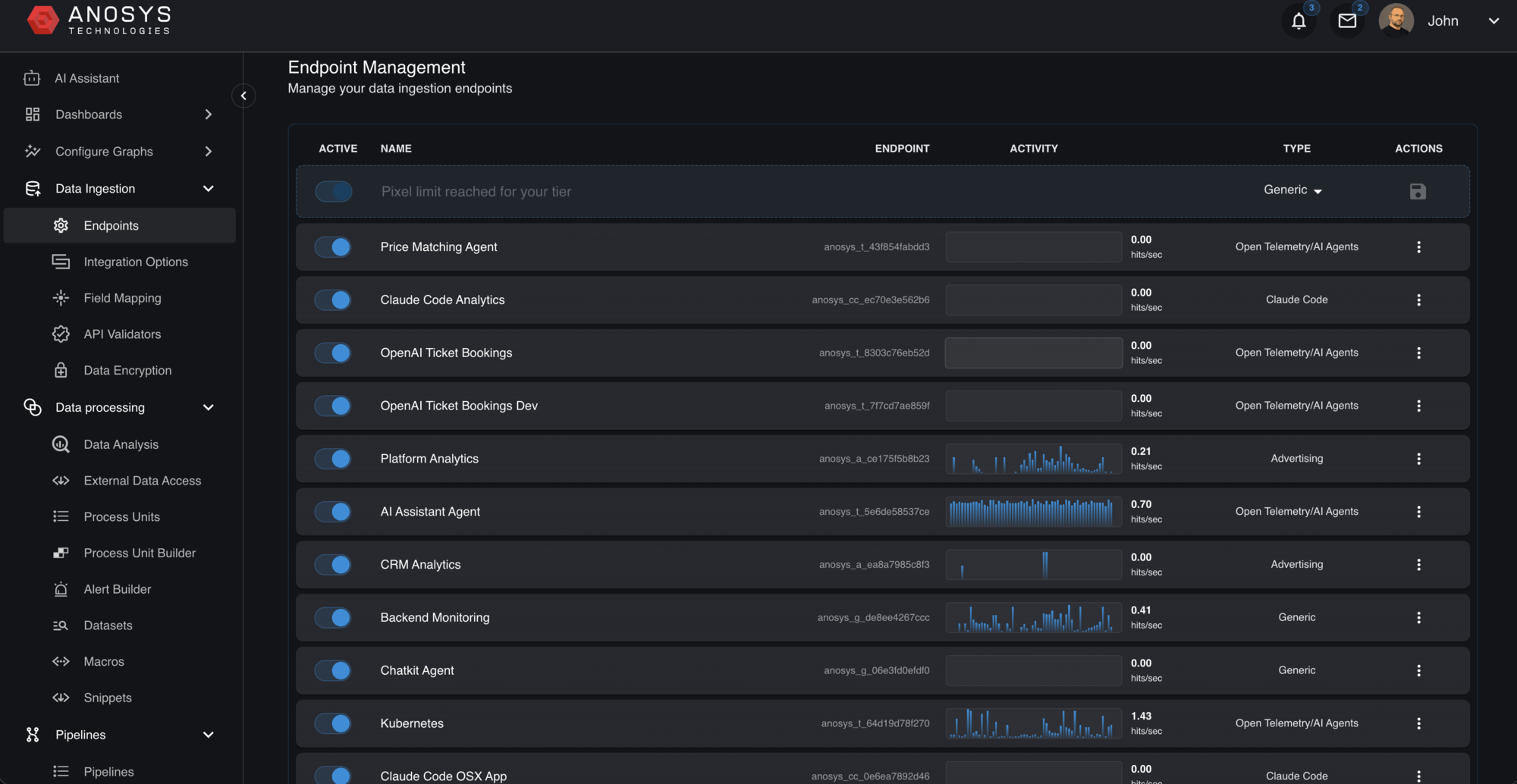
Every agent, model, and service in one place
Connect Claude Code, OpenAI agents, CRMs, Kubernetes, ad pipelines, backend services, and business workflows over OpenTelemetry, REST, SDKs, or files. Each endpoint streams live, with activity sparklines and a type so you always know what's flowing in.
- OTLP/HTTP, Collector, REST, JavaScript, and SDK ingestion
- Live per-endpoint activity and health at a glance
- First-class types for AI agents, Claude Code, and generic telemetry
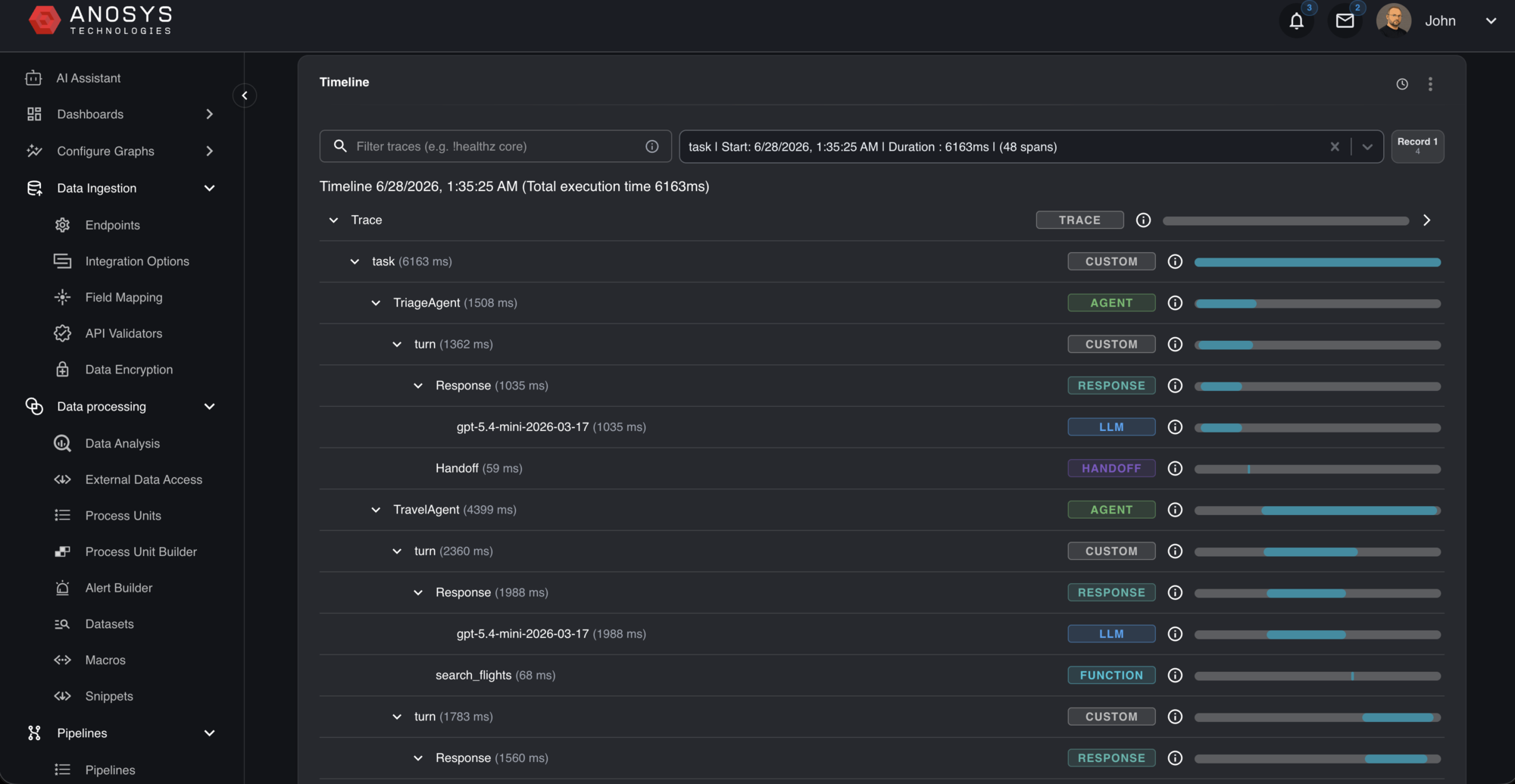
Follow every agent run, span by span
See the full execution timeline of a multi-agent workflow — triage, handoffs, turns, LLM calls, and tool functions — each with exact durations. Spot the slow span, the retry, or the handoff that stalled in seconds.
- Waterfall view of agents, turns, responses, and tool calls
- Per-span latency down to the millisecond
- Filter and jump across thousands of spans per trace
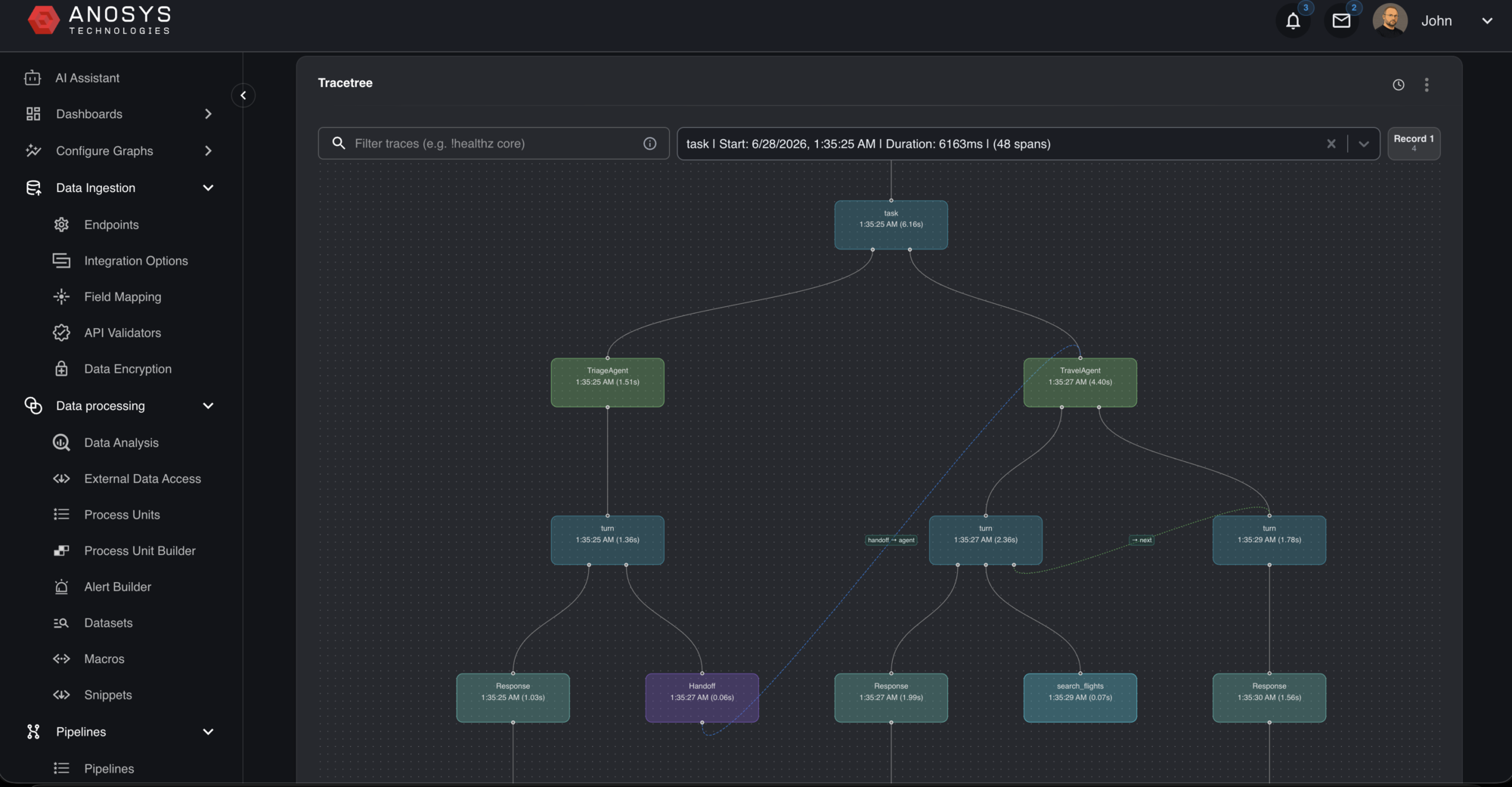
See the whole run as a graph
Switch from timeline to a trace tree to understand structure at a glance — how agents branch, where handoffs happen, and which tool and model calls hang off each step. The shape of a run often tells you what went wrong before the numbers do.
- Node graph of agents, responses, functions, and handoffs
- Instantly spot branches, retries, and dead ends
- Drill from any node back into the underlying spans
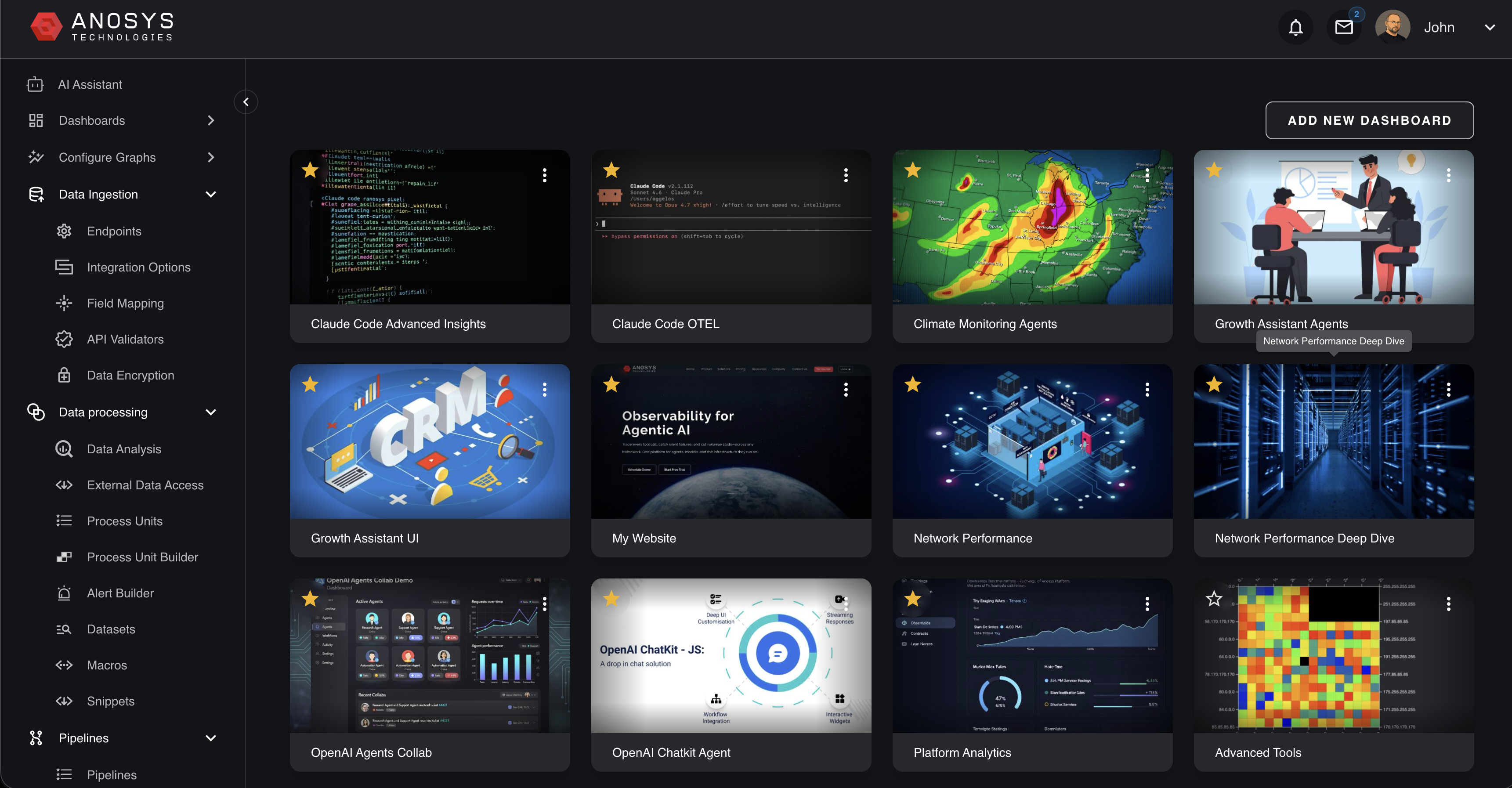
Dashboards for the metrics owners actually review
Start from a library of prebuilt dashboards — agent performance, cost, safety, refusals, network monitoring — or compose your own with drag-and-drop widgets. Every tile drills down to the trace or log line behind the number.
- Prebuilt views for health, quality, cost, and safety
- Custom dashboards with drag-and-drop widgets
- Drill from any KPI straight into the supporting evidence
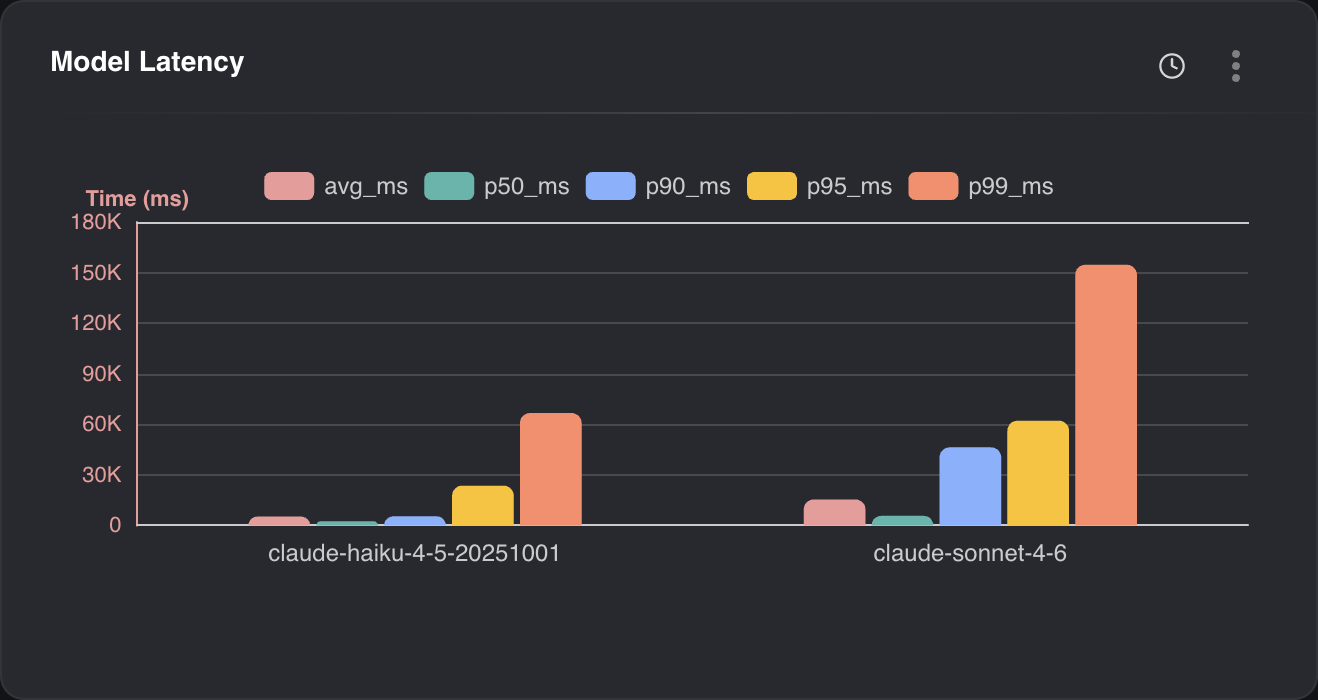
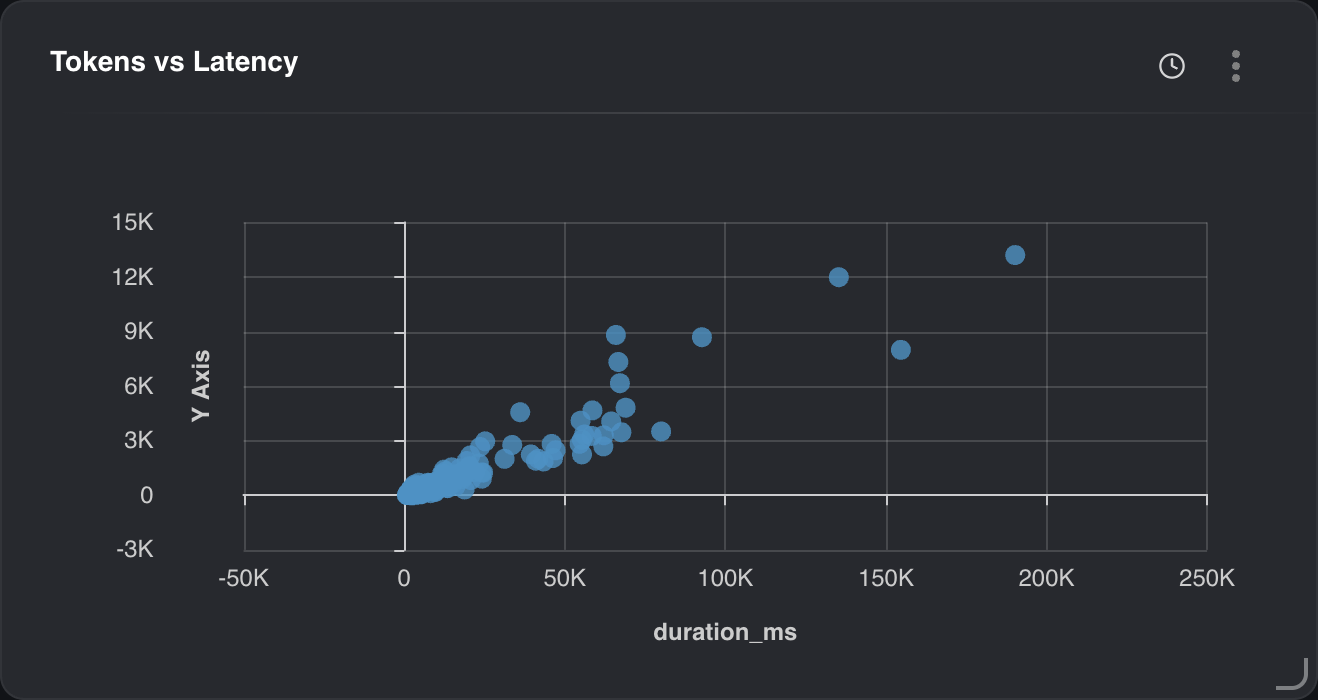
Compare models on latency, tokens, cost, and quality
Put models side by side on percentile latency, watch how tokens scale with duration, and connect spend to eval results and completed outcomes. Optimize model routing with evidence, not guesses.
- p50–p99 latency compared across models
- Token-vs-latency correlation to catch runaway calls
- Cost per successful task, workflow, team, and user
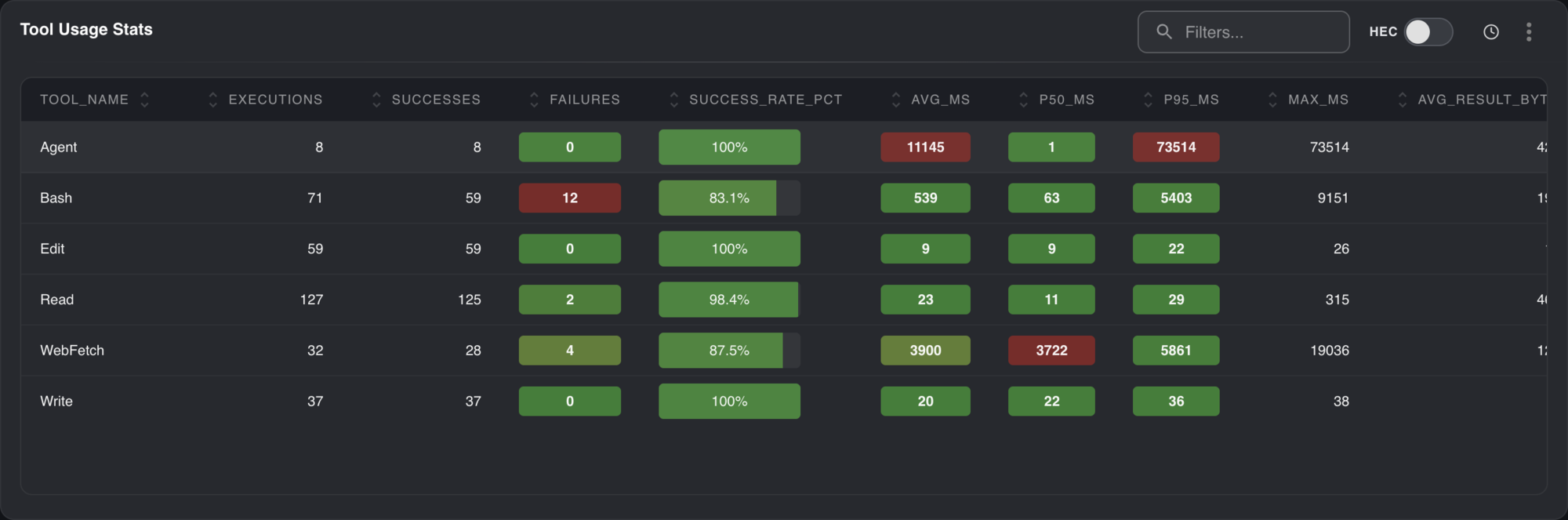
Know exactly how your tools perform
Every tool your agents call is measured — executions, success rate, and latency percentiles. Find the flaky integration dragging down reliability or the slow call inflating your p95 before it becomes a customer-facing incident.
- Per-tool success and failure rates
- avg, p50, p95, and max latency per tool
- Sortable, filterable, and ready for policies and ownership rules
Automate detection with pipelines and process units
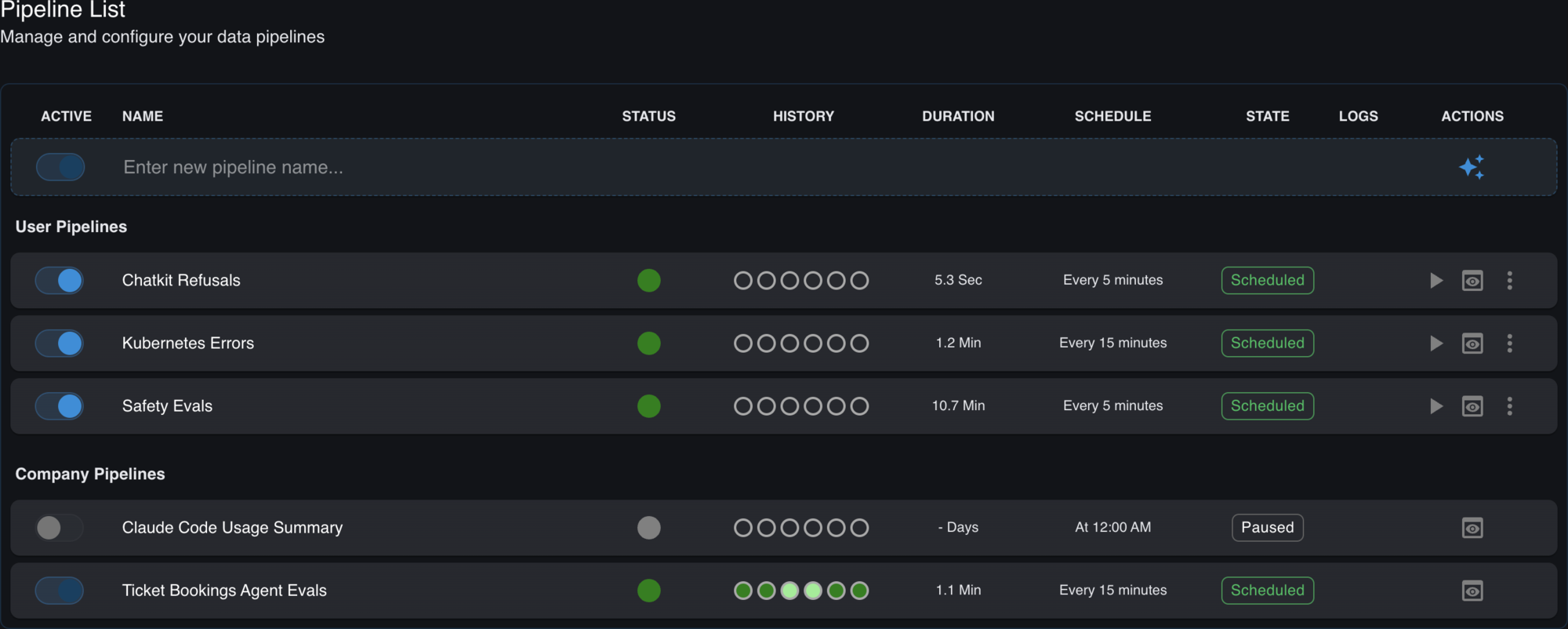
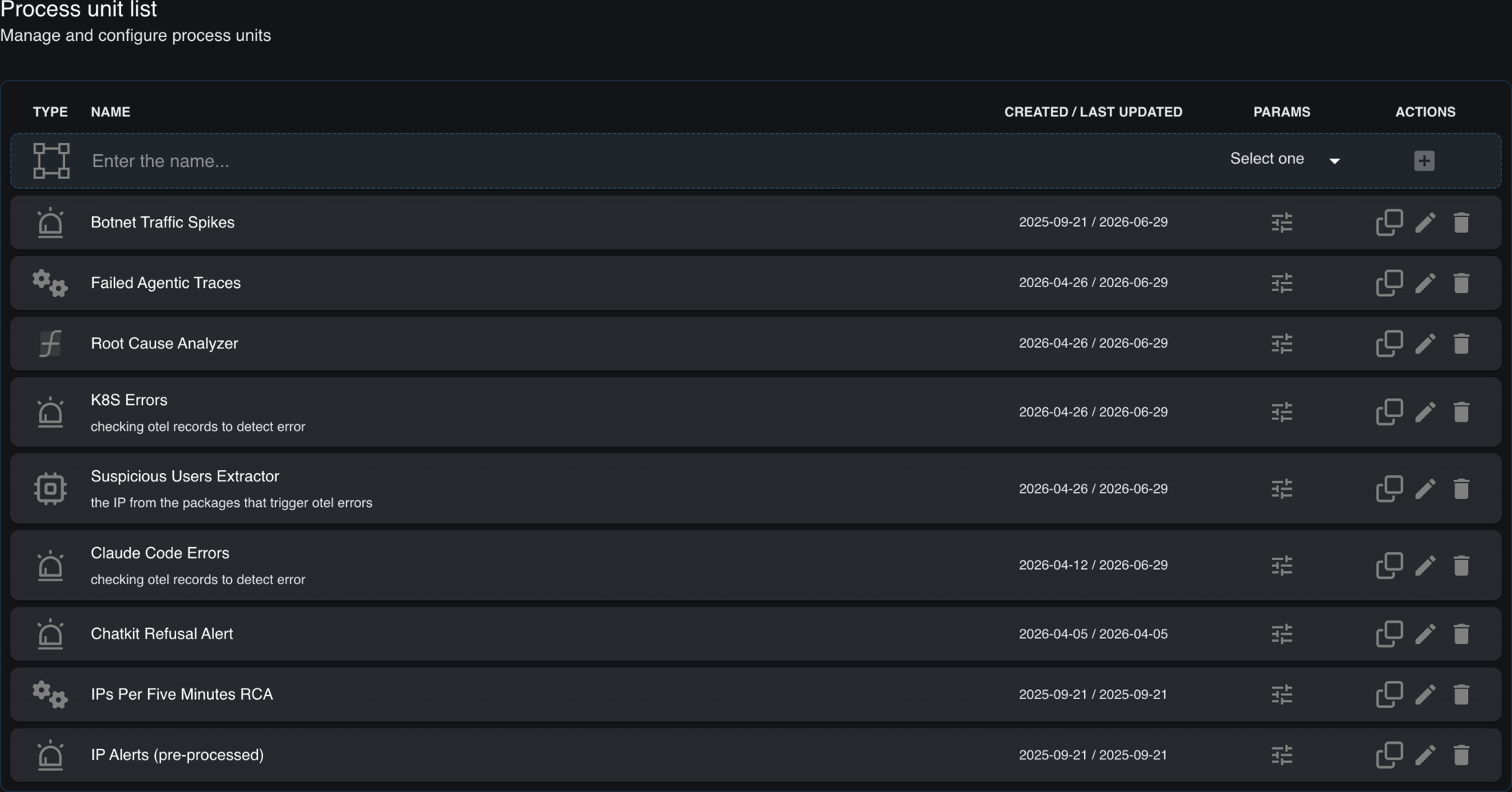
Schedule pipelines that watch for refusals, Kubernetes errors, or safety regressions on a cadence you set, and build reusable process units — root-cause analyzers, anomaly extractors, alert rules — that turn raw telemetry into action without glue code.
- Scheduled, status-tracked pipelines with run history
- Reusable process units for RCA, extraction, and alerting
- Route results to Slack, email, PagerDuty, or webhooks
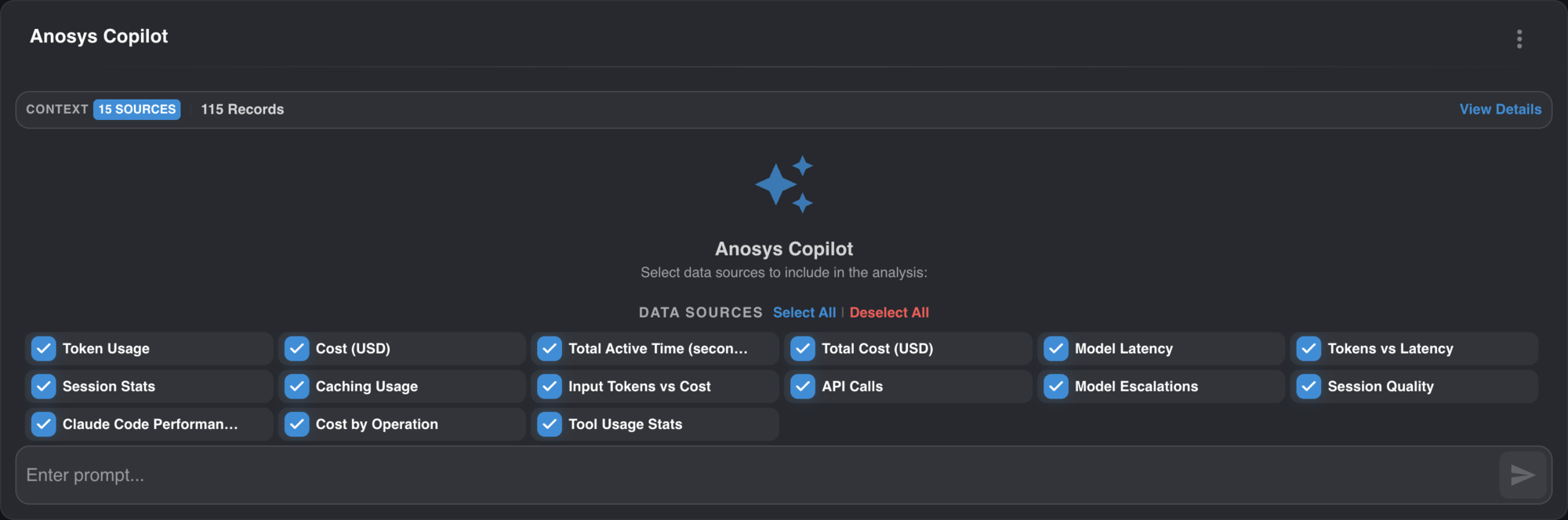
Ask in plain English with the Anosys Copilot
Pick the data sources that matter — token usage, cost, latency, session quality, tool stats — and ask a question. The Copilot reasons over your real telemetry to summarize incidents, compare models, and explain failures, no query language required.
- Scope analysis to exactly the signals you choose
- Natural-language investigation grounded in your data
- Shareable incident summaries in seconds