Debug your AI agents
Goal: see exactly what your agent did on each run: every model call, tool call, handoff, token count and error, in order. Time: about 5 minutes. You need: Python 3.10+ or Node.js, and your model provider key.
%%{init: {"flowchart": {"curve": "linear"}}}%%
graph LR
    A["Your agent code"] --> B["Anosys SDK<br/>(one line at startup)"]
    B --> C["OpenTelemetry / AI Agents<br/>endpoint"]
    C --> D["Trace Timeline<br/>and Trace Tree"]
Step 1. Create an endpoint and API key
- In the console, choose the Anosys SDK goal on the Choose Goal screen, or create an endpoint of type OpenTelemetry / AI Agents under Collecting → Endpoints.
- In Collecting → Integration Options, open the API tab and click Create New API Key.
- Set it in your environment:
Step 2. Install and initialize the SDK for your framework
Initialize the logger once, at startup, before you create your client or run your agent.
JavaScript: npm install anosys-sdk-claude-agents. See Anthropic and Claude Agent SDK.
Each call to a decorated function is logged with its arguments, return value and duration. For other frameworks, export OpenTelemetry spans instead: see OpenTelemetry.
Result: run your agent once. The endpoint's status changes to active within a few seconds.
Step 3. Tie runs to your users
Pass a function that returns the current user's session, so you can filter traces by user later:
All Anosys SDK loggers accept the same get_user_context option (getUserContext in JavaScript).
Step 4. Inspect a run
- Create a dashboard (Dashboards → All Dashboards) and add a Trace Timeline or Trace Tree widget from Visualizations, pointed at your endpoint.
- Pick a run. The timeline shows each span with its duration; the tree shows how agents, tools and model calls nest.
- Click a span to see its input, output, model, tokens and any error.
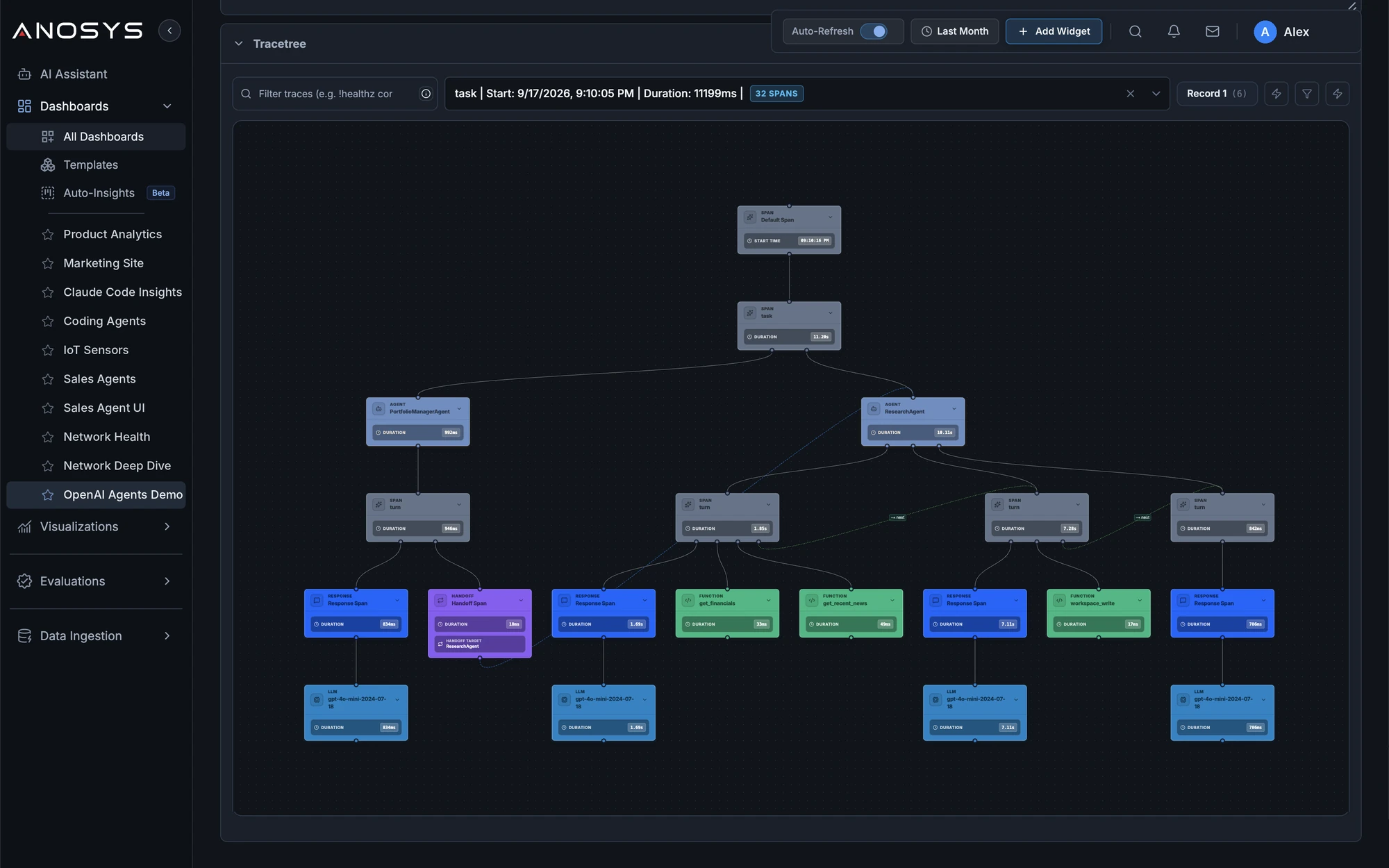
When something looks wrong, ask the AI Assistant, for example: "Why did the last three runs of my agent fail?"
Keep prompts private
You can send metadata only (model, timing, tokens, errors) without prompt or response text:
| SDK | Option |
|---|---|
| Anthropic, Claude Agent SDK | capture_content=False (captureContent: false in JavaScript) |
| OpenAI Agents SDK | capture_inputs=False, capture_outputs=False |
For field-level encryption with your own key, see Security and data controls.
Next steps
- Monitor agents in production: dashboards, alerts and scheduled evaluations
- Track AI spend: cost per model, user and workflow

